
JavaScript SEO and Crawl Budget: Diagnosing Index Issues
How Googlebot renders JavaScript, when client-side rendering breaks SEO, SSR vs SSG trade-offs, diagnosing crawl-budget waste, and the 'Crawled — currently not indexed' pattern.
Last updated:

You know how frustrating it is when a site that looks great to you is practically invisible to Google? That’s often the reality for websites built with modern JavaScript frameworks. What your users see and what Google’s crawler first sees can be two completely different things.
This disconnect is the core of JavaScript SEO.
Since our founding in 2011 by SEO veteran Adam Yong, we’ve seen this issue become more and more common for Malaysian businesses. A beautiful, interactive site fails to rank simply because its most important content isn’t immediately available to search engines. The technical details can get complicated, but the business impact is simple: lost visibility and lost revenue.
Our team approaches this with a specialised focus, which you can see in our Technical SEO service, because the solutions are different from typical SEO work.
Let’s break down how Google actually processes these sites, the common failure points we see, and how to make sure your content gets indexed correctly.
How Googlebot renders JavaScript
Googlebot indexes JavaScript-heavy content using a two-phase process. This is the most critical concept to understand in JS SEO.
Phase 1: Crawling. Googlebot first fetches your page’s initial HTML. For a well-configured site, this contains the most important content. For a default client-side rendered (CSR) app, it might just be a blank page with a “Loading…” message. Google’s crawler makes a note of any JavaScript files and moves on.
Phase 2: Rendering. Later, if Google determines rendering is needed, the URL is sent to the Web Rendering Service (WRS). The WRS uses an “evergreen” version of Google Chrome to execute the JavaScript and render the full page. Only after this second step is the final content available for indexing. This rendering phase can take anywhere from a few hours to several weeks.
This delay is precisely why Single-Page Applications (SPAs) often struggle with SEO. Any content that relies on JavaScript execution, like product descriptions or blog posts, isn’t seen during the initial crawl. For news sites or e-commerce stores in Malaysia that depend on fresh content, this delay can be a major roadblock to ranking.
When client-side rendering breaks SEO
There are four common scenarios where relying on client-side rendering (CSR) causes serious SEO problems. We see these patterns repeatedly in audits.
1. Content above the fold is JavaScript-rendered. If your main headline, product details, or call-to-action only appear after JavaScript runs, Google’s first impression is an empty shell. This signals a poor user experience and can harm rankings.
2. Internal links are JavaScript-rendered. Navigation menus, category links, or related articles that are rendered client-side are invisible during the first crawl. This means Googlebot can’t discover those pages easily, hindering the flow of authority through your site.
3. Page-load time is slow. Core Web Vitals are a confirmed Google ranking factor. CSR sites often have a slower Largest Contentful Paint (LCP) and a worse Interaction to Next Paint (INP) because the browser must download, parse, and execute large JavaScript bundles before the main content can be displayed.
4. Critical metadata is JavaScript-rendered. Your page title, meta description, and canonical tags must be in the initial HTML. Framework tools like React Helmet often inject these tags using JavaScript, which means Google doesn’t receive these critical signals until the second rendering phase, delaying proper indexing.
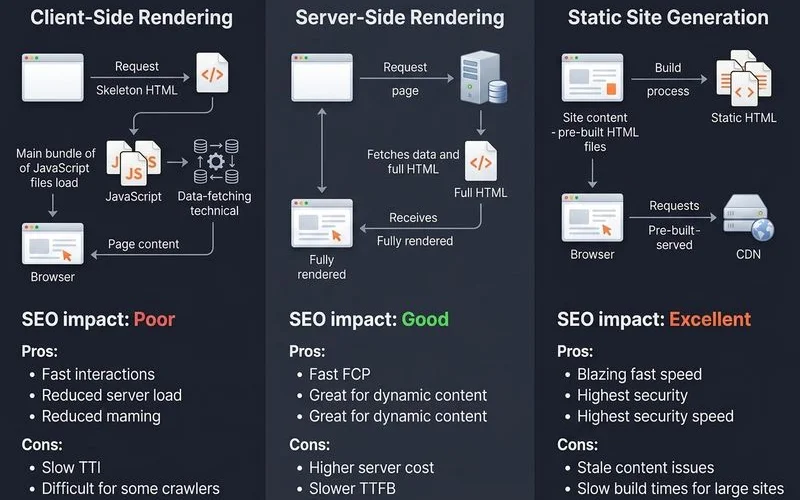
SSR vs SSG trade-offs
Server-side rendering (SSR) and static site generation (SSG) are the two most reliable alternatives to client-side rendering for SEO.
Server-side rendering (SSR). The server generates the full HTML for a page with every request. This is great for content that needs to be fresh or personalised. However, it requires a running Node.js server (or similar) and can be slower on the first request compared to SSG.
Static site generation (SSG). The entire site is pre-built into static HTML files. These files can be served incredibly quickly from a global Content Delivery Network (CDN). This approach offers the best performance and lowest hosting cost, making it ideal for content sites. The main drawback is that any content change requires the site to be rebuilt.
Here’s a simple breakdown of the best fit for different use cases:
| Use case | Best fit |
|---|---|
| Marketing site, blog, service pages | SSG (Astro, Next.js static export) |
| E-commerce product catalogue | SSG with incremental rebuilds, or SSR for live data |
| User dashboards behind login | CSR (no public SEO concern) |
| News sites with fresh content | SSR or SSG with frequent rebuilds |
| Listing sites with filtering | SSR with careful crawl management |
For most Malaysian e-commerce and service businesses we work with, SSG is the recommended path. Frameworks like Astro are particularly powerful here because of their “Islands Architecture”, which ships zero JavaScript by default, leading to significantly faster load times. A test comparing Astro to Next.js for static sites found Astro produced 90% less JavaScript and loaded 40% faster.
Diagnosing crawl-budget waste
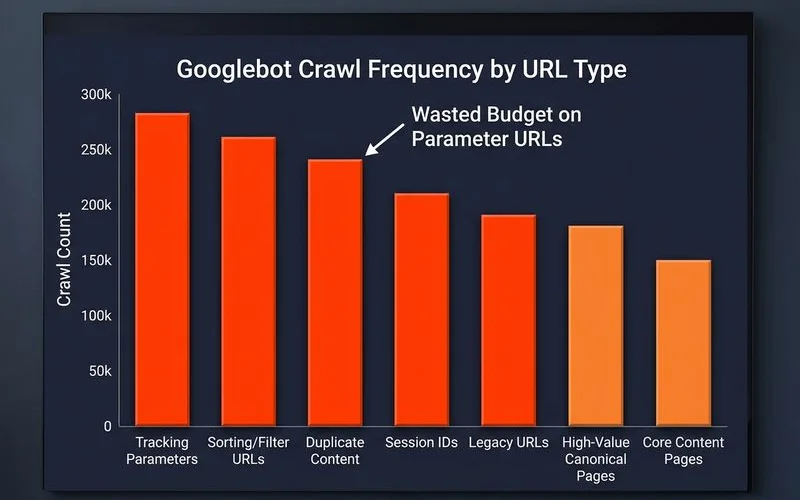
Crawl budget is the number of pages Googlebot will crawl on your site in a specific period. While most Malaysian SMEs with fewer than 10,000 pages don’t need to worry about this, it’s a critical issue for larger sites. E-commerce stores with faceted navigation or news sites often waste a huge portion of their budget on low-value URLs.
Our diagnostic workflow looks like this:
- Analyse GSC Crawl Stats. We start in Google Search Console to review the last 90 days of crawl activity. This gives us a top-level view of how Google is interacting with the site.
- Conduct Server Log Analysis. For a deeper look, we analyse server logs from the last 7 to 30 days. Filtering for Googlebot’s user agent shows us exactly which URLs are being hit. We use tools like the Screaming Frog SEO Log File Analyser to import and analyse this raw data efficiently.
- Compare Crawl Frequency to Page Value. High-value pages, like key products or popular blog posts, should be crawled frequently. We cross-reference the log data with analytics to ensure this is happening.
- Identify Wasted Budget. The most common sources of waste are URL parameters from filters (e.g.,
?colour=blue), sorting options, session IDs, and deep pagination pages. These URLs create duplicate or low-value content that consumes the crawl budget.
The “Crawled — currently not indexed” pattern
This is one of the most common indexing issues we see, especially with SPAs in the Malaysian market. Google Search Console reports that pages have been crawled but not added to the index. The underlying cause is usually one of three things.
- Thin content. Google crawled the page but decided it doesn’t offer enough unique value to be worth indexing. This often happens with auto-generated category or tag pages that lack unique descriptive text.
- Duplicate content. Multiple URLs are serving the same or very similar content, a common result of faceted navigation that uses URL parameters without proper canonical tags.
- Slow rendering. The page relies on so much JavaScript that Google’s rendering service takes too long, causing Googlebot to deprioritise the URL for future crawling and indexing.
The fix involves a clear sequence of actions:
- Move public-facing pages to an SSG or SSR framework.
- Ensure unique, valuable content is present in the initial HTML, especially above the fold.
- Consolidate thin pages or prevent their indexing using a “noindex” tag.
- Implement correct canonical tags to resolve duplicate content from URL parameters.
- Use your
robots.txtfile to block Google from crawling low-value parameter-driven URLs.
A quick way to check what Google sees is to use the URL Inspection Tool in Google Search Console. Its “View crawled page” feature shows you the rendered HTML that Google uses for indexing.
What we diagnose in an audit
For JavaScript-heavy websites, a standard technical audit isn’t enough. Our audit process includes a specific JavaScript SEO layer to get to the root of these complex issues.
This involves comparing the initial HTML with the final rendered DOM to see exactly what content is missing on the first pass. We also analyse hydration costs, which is the time it takes for your page to become fully interactive for a user. This directly impacts Core Web Vitals and user experience. Based on our findings, we provide a clear migration path from CSR to a more SEO-friendly framework like SSR or SSG.
Want a JavaScript SEO diagnosis for your site? — Request a discovery call.
Quick Answers
Do all JS frameworks have SEO issues?
How do I know if I'm wasting crawl budget?
What's the difference between CSR, SSR, and SSG?
Related Guides
Core Web Vitals Explained — LCP, CLS and INP
Each metric defined (LCP, CLS, INP — replaced FID in 2024), thresholds for good/needs improvement/poor, how to measure, and the common causes of failures.
Technical SEO Audit Checklist for Malaysian Websites
Crawl, index, Core Web Vitals, mobile, hreflang for bilingual EN/BM sites — the full Stage 1 audit checklist Adam SEO runs on every new client.
Ready for the service?
Learn more about Technical SEO Audits
Stage 1 deep-dive audits covering crawl, indexation, Core Web Vitals, schema, and JavaScript rendering — the foundation that every other SEO investment sits on.
Explore the Technical SEO Service