
Schema Markup for Online Stores
Product / Offer / AggregateRating / Review / Breadcrumb schemas explained with working JSON-LD examples, validation tools, and the impact on click-through rate.
Last updated:

The five schemas every Malaysian online store needs
You see it in every competitive Malaysian e-commerce search result, those little extras that make a listing pop. Star ratings, prices, and stock levels appearing right there on Google, all before a user even clicks. That isn’t luck, it’s a direct result of using ecommerce schema markup.
Since our founding in 2011, we’ve seen a lot of SEO trends come and go. Schema isn’t a trend, it has become a foundational piece of technical SEO, especially now that Google’s AI Overviews can use this data to answer user questions directly.
Think of schema as a clear label you put on your website’s data. Instead of making Google guess what your product page is about, you are telling it directly. This simple act of clarification is what unlocks those eye-catching rich results in search.
Here’s our breakdown of the five essential schema types that cover almost every use case for an online store in Malaysia. We will walk through what they are, why they matter, and the common errors we see every week.
Product (the foundation)
The Product schema is the core of your ecommerce schema markup. It describes the specific item you are selling. You must include the product’s name, a description, at least one image, and the brand. We also strongly recommend adding the SKU, a global identifier like a GTIN or MPN, and specifics like category, colour, or material. The on-page content these fields describe — clear titles, structured specs, real review widgets — is covered separately in our product page SEO checklist.
A complete product schema helps search engines understand exactly what you are selling, which is the first step to showing it to the right customers.
{
  "@context": "https://schema.org",
  "@type": "Product",
  "name": "Wireless Mesh Router AX5400 Wi-Fi 6",
  "description": "Tri-band mesh router with 5,400 Mbps total throughput.",
  "image": "https://store.example.my/images/router-ax5400.jpg",
  "sku": "RTR-AX5400",
  "brand": { "@type": "Brand", "name": "TechBrand" },
  "category": "Networking > Wi-Fi Routers"
}
Offer (nested in Product)
The Offer schema is where the commercial details live. It’s nested inside your Product schema and communicates the price, currency, stock availability, and how long the price is valid. Without a valid Offer schema, Google cannot display pricing and availability, which are two of the most powerful elements for attracting clicks in search results. Be sure to set priceCurrency to “MYR” for Malaysian Ringgit.
"offers": {
  "@type": "Offer",
  "url": "https://store.example.my/router-ax5400/",
  "priceCurrency": "MYR",
  "price": "899.00",
  "availability": "https://schema.org/InStock",
  "priceValidUntil": "2026-12-31"
}
AggregateRating (only when reviews exist)
This schema powers the star ratings you see in search results. It is crucial that you only implement AggregateRating if you have genuine customer reviews visible on the product page. Marking up a rating without displaying the corresponding reviews is a violation of Google’s guidelines and can lead to penalties.
"aggregateRating": {
  "@type": "AggregateRating",
  "ratingValue": "4.6",
  "reviewCount": "138"
}
Review (for individual reviews shown on the page)
For every customer review you display on the page, you should have a corresponding Review entry nested within your schema. This tells search engines about the individual reviews that make up the aggregate rating. Key details include the reviewer’s name, the date it was published, the rating they gave, and the text of the review itself.
"review": [
  {
    "@type": "Review",
    "author": { "@type": "Person", "name": "Tan W. M." },
    "datePublished": "2026-04-15",
    "reviewRating": { "@type": "Rating", "ratingValue": "5" },
    "reviewBody": "Coverage hits every corner of my 1,800 sq ft apartment."
  }
]
Breadcrumb (across product and category templates)
Breadcrumb schema, technically BreadcrumbList, outlines your site’s structure for search engines. It shows the path from your homepage to the current page, like Home > Category > Product. This reinforces your site hierarchy and powers the breadcrumb links that appear in search results, making navigation clearer for users. A 2025 Google update removed the visual breadcrumb from mobile SERPs, but its importance as a structural signal for crawlers has only increased.
{
  "@context": "https://schema.org",
  "@type": "BreadcrumbList",
  "itemListElement": [
    { "@type": "ListItem", "position": 1, "name": "Home", "item": "https://store.example.my/" },
    { "@type": "ListItem", "position": 2, "name": "Networking", "item": "https://store.example.my/networking/" },
    { "@type": "ListItem", "position": 3, "name": "Wi-Fi Routers", "item": "https://store.example.my/wifi-routers/" },
    { "@type": "ListItem", "position": 4, "name": "Mesh Router AX5400", "item": "https://store.example.my/router-ax5400/" }
  ]
}

Validation tools
Before deploying any changes, you must validate your code. Skipping this step can lead to errors that make your schema useless or even harmful.
| Tool Name | Primary Use | Why We Use It |
|---|---|---|
| Google Rich Results Test | Google-Specific Validation | This is the most important test. It checks if your schema is not only technically correct but also eligible for Google’s rich results. If your code passes here, you can be confident it will work in Google Search. |
| Schema.org Validator | General Schema Validation | This tool validates your code against the full Schema.org specification. It’s more comprehensive and can catch structural issues that Google’s tool might ignore, ensuring your markup is universally correct. |
| Browser DevTools | Implementation Check | This isn’t a validator, but a final sanity check. Use your browser’s “Inspect” tool to view the page’s source code and confirm that your <script type="application/ld+json"> tag is present and contains the correct, fully rendered JSON-LD. |
Common implementation errors
We perform e-commerce SEO audits every week, and these five schema markup errors appear constantly.
- AggregateRating marked up but no visible reviews. This is the most frequent issue. A page claims to have reviews in its schema, but none are visible to the user. This is a direct violation of Google’s guidelines and can get you penalised.
priceValidUntilmissing or expired. Google wants to show users fresh, accurate pricing. If you omit this property or let the date expire, Google is less likely to show your price in the search results. Our advice is to set this date 6 to 12 months in the future and have a process to update it.availabilityset toInStockwhen product is sold out. Incorrect stock information creates a poor user experience. If a product is out of stock, your schema must reflect that usingOutOfStockorPreOrder. Misrepresenting availability can lead to manual penalties.- Brand markup as a string instead of nested Brand schema. While using a simple string like
"brand": "TechBrand"is technically valid, it’s not ideal. Nesting the brand as aBrandobject with an@typeandnameprovides a clearer, entity-based signal that search engines prefer for building their knowledge graph. - Multiple conflicting Product schemas on the same page. This often happens with apps or JavaScript that dynamically select product variants. The script might inject new schema without removing the old one, leaving two
Producttypes on the page and confusing search engines.
Impact on click-through rate
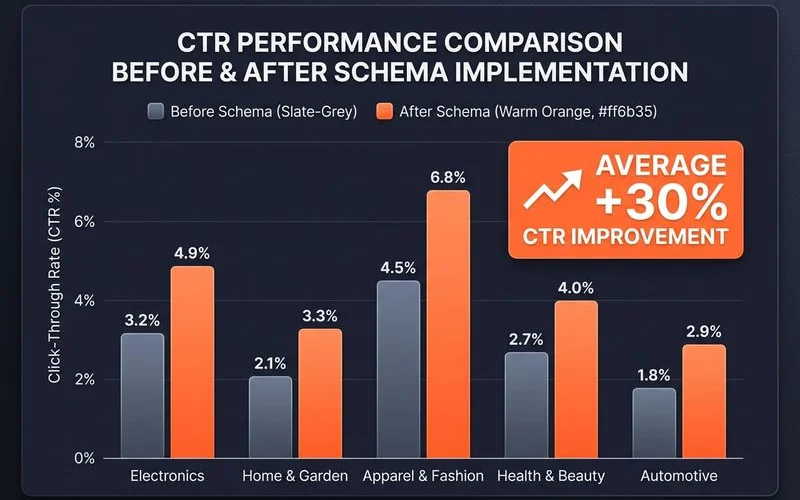
The visual enhancements from a correctly implemented ecommerce schema markup directly impact user behaviour. Our own work, including a 283% revenue case study, consistently shows that rich results for products lift the click-through rate (CTR) from search results by 15-30%.
This happens because the extra information, like star ratings and pricing, makes your listing more noticeable and trustworthy compared to plain blue links. A higher CTR is a strong relevance signal to Google, which can lead to improved rankings over time.
While AI Overviews are changing search behaviour, recent data from early 2026 suggests that rich snippets are still highly effective at drawing user clicks.
Platform-specific notes
How you implement schema depends on your e-commerce platform. Here’s a quick overview of the most common setups we see in Malaysia.
- Shopify — Most modern Shopify themes have basic Product schema built-in. However, they often lack key fields like
priceValidUntil. For robust review schema, apps like Judge.me, Loox, or Stamped.io are excellent choices as they handle theAggregateRatingandReviewinjection correctly. - WooCommerce — The Yoast SEO plugin adds Product schema by default, but its implementation can be incomplete. It often requires custom JSON-LD additions, either through custom code or another plugin, to fully flesh out the
Offerand other nested details. - Magento (Adobe Commerce) — The native schema support in Magento is only partial. To get complete and accurate coverage, an extension is necessary. Our team has had good results with solutions from Amasty, Mageplaza, or the MageWorx SEO Suite Ultimate.
- Custom platforms (Astro, Next.js + headless commerce) — For custom builds, you have full control. The cleanest method is to inject the JSON-LD script directly at the template or component level, pulling dynamic data from your commerce backend. This approach avoids the conflicts that can arise from client-side injection.
Properly implemented schema is no longer a “nice-to-have” for serious online stores, it’s a competitive necessity. It’s one part of a complete e-commerce SEO service that drives measurable organic revenue growth.
If you are unsure whether your store’s schema is working correctly, a technical audit can provide a clear path forward.
Want a schema audit on your store? — Request a discovery call.
Quick Answers
Will rich results always show?
Can I implement schema via Google Tag Manager?
Does product schema affect rankings directly?
Related Guides
E-commerce SEO vs Google Shopping Ads — Which Wins?
Cost-per-acquisition over time, when Shopping Ads make sense (launch, low authority), when SEO wins (margin, brand), and the hybrid approach for mature stores.
Product Page SEO Best Practices (2026 Edition)
Title-tag patterns for products, structured-data implementation (Product, Offer, Review), unique-content vs manufacturer copy, image SEO, and category-page linking.
Ready for the service?
Learn more about E-commerce SEO
Tailored organic-growth strategies for Malaysian and regional online stores — product page SEO, category architecture, structured data, and CRO-integrated growth.
Explore the E-commerce SEO Service